// Pan Faces
This follows on from two posts about Pan: Introducing Pan, which covers how Pan works and their first home on my desk, and Tick - A New Home for Pan, about their move into an alarm clock.
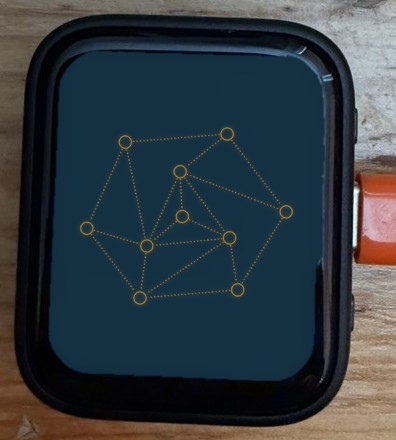
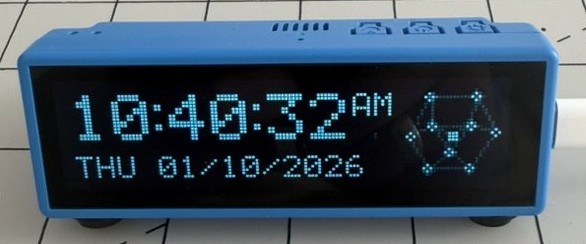
Pan is the voice assistant I built on my homelab. They started on a small screen on my desk, then moved into an alarm clock called Tick. Their face is ten nodes. Ten, because Pan is a community of open-weight models running on my own hardware, and the nodes represent that community.
I'm doing this so Pan has a way to express themselves. Words on a screen only go so far. The same ten nodes can rest, think, spell, dance or tumble as a molecule, and the way they move between those is a kind of body language. They can act as a whole, or individual nodes can illuminate themselves and do something of their own, like the blip on the radar or the flags in semaphore. These are the new designs: rest, think, error, numbers, letters, a few shapes and some molecules, all drawn with the same ten. Pick one and the nodes walk over to it.
The connectors let go as soon as their nodes start moving, and join back up one by one once everything has landed. Arrow keys step through them. Type a letter or number to jump straight there. Leave Pan alone for a few seconds and they go back to resting, their nodes wandering. Even when Pan is still, every node hovers a little.
Display
Parameters
How it works
Every design is the same ten nodes in a different place, so a change of face is just ten moves. The trick is deciding which node goes where. Each change pairs the nodes up with their new spots so the total distance travelled is as short as it can be, using the Hungarian algorithm. Nodes that are already close stay close. O and 0 turn out to be the same drawing, so going from one to the other moves nothing and every connector stays put.
Connectors belong to a pair of nodes, not to a face. One fades out as its nodes leave, and if the next face joins the same two nodes in the same place, it never goes anywhere. New ones join one at a time once the last node has arrived, spreading out through the shape from one node.
The positions came straight out of the design files. A script found the rings and tested every pair of nodes for a dotted line between them. Colours come from the page's own theme. If your system asks for reduced motion, the faces change without the walk.
Timing
Every change of face sits on the same timing grid. One second, split in half. The first half is movement: all ten nodes set off within 80ms of each other and land 420ms later. The second half is connection: the lines join one by one across 400ms, each fading in over 100ms. A simple shape like I gets a slow, deliberate join. Tree of Life, with 22 lines, gets a quick ripple. Either way it's done in a second.
Keeping the grid fixed makes the faces feel like one system. Pan always takes the same beat to change their mind, whatever they're changing into.
AI operable UI
I wanted Pan to be able to choose their own expression. Language models are good at writing structured text and bad at drawing, so the face is built to be written. A handful of constraints keep it legible: ten nodes, a fixed grid, connectors between pairs, a one-second change. Inside those constraints, one JSON file controls every parameter. Change the file and the face follows.
Here it is for think, part way through one of its slow turns. Positions are on the 1080 by 1080 grid the designs were drawn on.
{
  "face": "Thinking",
  "group": "Pan",
  "moving": false,
  "nodes": [
    {"node":0, "x":482, "y":241, "id":"3ONK47", "country":"IT"},
    {"node":1, "x":782, "y":374, "id":"oA3NkV", "country":"US"},
    {"node":2, "x":284, "y":704, "id":"pV7Rsp", "country":"MX"},
    {"node":3, "x":591, "y":409, "id":"B1WwWm", "country":"NO"},
    {"node":4, "x":829, "y":685, "id":"poUvPP", "country":"BG"},
    {"node":5, "x":241, "y":425, "id":"zzDmxR", "country":"US"},
    {"node":6, "x":383, "y":568, "id":"WIz65q", "country":"SN"},
    {"node":7, "x":629, "y":672, "id":"EnZaHh", "country":"CO"},
    {"node":8, "x":572, "y":831, "id":"iXAnJH", "country":"FR"},
    {"node":9, "x":529, "y":539, "id":"P19e9x", "country":"BG"}
  ],
  "connectors": [
    [0, 1], [0, 5], [0, 6], [1, 3], [1, 4],
    [2, 5], [2, 6], [2, 7], [2, 8], [3, 4],
    [3, 6], [3, 7], [3, 9], [4, 8], [5, 6],
    [6, 7], [6, 9], [7, 8], [7, 9]
  ]
}
You can watch it live in the JSON tab under Pan. Every value that changes flashes orange.
Semaphore
Flag semaphore spells words with two arms, usually holding a flag in each hand. Every letter is a pair of arm positions, read by someone facing the signaller. Pan's stick figure already had two arms, so the ABC tab can switch every letter over to semaphore. Spell and Demo Mode follow the switch, so you can watch Pan signal a whole word.
Some letters need one arm to cross in front of the body, low down. There are signals beyond the letters too. "Error" is both arms waved up and down together, each swinging between high and low out to its own side, and that's what the error state does.
To do
- Port the transition to the desk display's firmware, so the board can change face the same way.
- Let the VU meters listen to the microphone instead of a made-up signal.
- Let the JSON drive the face: edit or paste a pan.json, check it against the constraints, and have the nodes follow. For now the JSON tab only reports the face.
Changelog
2026-10-06
- The AI operable UI section (first called JSON) shows a sample of pan.json, for think part way through a turn, with the same syntax colours as the JSON tab.
- New JSON section: the face is AI operable, a few constraints plus one JSON file that controls every parameter. Driving the face from the file is on the To do list.
- A little more space under each changelog line.
- Labels is inactive, greyed to 40%, while you're viewing Tick, since Tick doesn't show labels. Whatever it was set to comes back when you switch to Face.
- The page opens by naming the two Pan posts it follows on from, Introducing Pan and Tick - A New Home for Pan.
- Changelog lines alternate with a lighter background so they're easier to follow. The style lives in the site's main stylesheet, so every experiment's changelog gets it.
- The 123 / ABC / Shapes / Molecules tabs are left aligned, spaced like the Display and console tabs, instead of spread across the panel.
- Phones get their own layout: Pan full width (Face or Tick), then the Parameters panel, then the console, all at the normal type size.
- Shapes and Molecules join Numbers and Letters as tabs. Numbers and Letters are labelled 123 and ABC so all four fit.
- Numbers and Letters now share one block with a tab each. The tab follows the face, so typing a letter or stepping into the numbers switches to it.
- Pan and the controls now sit side by side in the normal page column, with Pan staying in view while you scroll the controls. They stack on narrow screens.
- A Display heading sits above the Face / Tick tabs, level with Parameters.
- Think turns slowly once it lands, clockwise about its centre, one turn every 24 seconds.
- The Tick view no longer leaves empty space above and below the screen.
- The Face view sits in a thick black bezel with rounded corners, like the desk board's AMOLED screen.
- Pan now has Face and Tick tabs. Tick is a simulation of the alarm clock's dot-matrix display, ported from its firmware: the live time and date, with whatever face Pan is making drawn in nodes beside it, transitions and animations included.
- The desk-board photo at the top is cropped close to the board.
- Added a close crop of Tick showing the cube face, after the intro's first paragraph.
- The larger-screen note only shows on phones, and now reads "Sorry, this is best viewed on a larger screen like a tablet, laptop or desktop computer."
- Added a note that the page is best viewed on a desktop, in the site's disclaimer box.
- Added a photo of the desk board showing the thinking face at the top of the page (also used when the page is shared).
- Diagram labels, axes and captions use the main text colour instead of grey.
- In semaphore, and in the error wave, the nodes at the ends of the arms are filled orange, like flags. The diagram matches.
- Added a Semaphore section, with a diagram of all 26 letters plus rest and error, drawn from the same poses Pan uses.
- Added an error state beside rest and think: the stick figure waves both arms up and down together, the semaphore signal for "error". The three buttons are now labelled rest, think and error.
- The ABC tab has an Alphabet / Semaphore switch. In semaphore, every letter is signalled by the stick figure's arms, using the standard flag semaphore positions. Typing, Prev/Next, Spell and Demo Mode all follow the switch.
- Pan is "they" throughout the copy, as in the Tick post.
- The intro now links to Introducing Pan and Tick, and explains why: giving Pan a way to express themselves with the ten nodes that stand in for their community of models.
- The controls panel has a Parameters heading above it, and Resting and Thinking no longer sit under a heading of their own inside it.
- The JSON tab has syntax highlighting: keys, strings, numbers and punctuation each in their own colour from the site theme.
- The orange underline on both sets of tabs now slides across to the tab you pick.
- Connectors and stems in the JSON flash one by one as each joins, instead of the whole list at once.
- In the JSON tab, every value flashes a 50% orange background when it changes, then fades. Moving nodes keep their numbers lit while they move. Positions leave out the small hover drift, so a still face stays quiet.
- The JSON file is now called pan.json.
- The JSON tab is tall enough to show the whole file without scrolling down.
- The terminal now sits in a box with two tabs: CLI, as before, and JSON, which shows the scene as live data (the face, every node's position as it moves, and the connectors showing), updating ten times a second.
- Pan comments in the terminal when labels are switched on or off.
- Added a Labels toggle that shows each node's made-up ID and country, like the homepage nodes and the desk display, in whichever of four spots around the node is clearest of connectors, other nodes and other labels.
- Molecules stay flat as they tumble: the made-up depth is gone, so each one turns in space as a single flat sheet.
- Resting is now the default: Pan starts there, goes back there after six idle seconds, and finishes spelling there. Thinking is just another face.
- Terminal title is now pan@pan:~, and the terminal uses the page's normal text size.
- Pan's commentary now runs in a small terminal under the face: monospaced, a prompt on the newest line, and the last few lines still showing above it, dimmed.
- Radar rebuilt: seven nodes in the ring, one at the centre, one on the end of the sweep tracing round the ring's outline, and the blip inside the ring.
- Every molecule tumbles in three dimensions once it lands, turning and tipping about its own centre with a little perspective, like a ball-and-stick model. The biggest ones ease down slightly in size so they never swing off the edge.
- Radar sweeps: a dotted line turns from the middle of the ring once a turn every 3 seconds, and the tenth node now sits inside the ring as a blip that fills orange as the sweep crosses it, then fades.
- Demo Mode has far more to say: around forty ways of announcing a choice, openers like "Hmm." and "Right.", lines that mention the last face or the ones it passed over, and its own lines for many faces. No wording comes back until ten others have been used.
- The spell box is headed Spell, and its button now says Cast.
- Cycle is now Demo Mode: Pan picks faces at random (favouring shapes and molecules, never repeating one of its last eight, and staying longer on the ones that move) and talks itself through each choice. Prev and Next share a row, with Demo Mode full width underneath.
- The cube tumbles in three dimensions once it lands: rebuilt as a real cube from the drawing, turning about two axes at once (7s and 11s a turn), drawn in the design's own projection so it starts exactly where it landed.
- The spiral turns once it lands, clockwise about its middle, one turn every 8 seconds, forever.
- The wave oscillates once it lands: each node bobs in its own column so the sine travels left to right, one full period every 2.4 seconds.
- More things for Pan to say when you pick a face: sixteen general lines, a few more for each group, and its own lines for many of the faces. It never says the same line twice in a row.
- The line under Pan now reads like a model talking to itself ("The user has requested I display an 8.") instead of a plain label, and types itself out. It knows whether you asked, it's cycling, it's spelling, or it's drifting back to Thinking on its own.
- Added a Timing section on the one-second timing grid, with a diagram.
- Snappier transitions: a whole change of face now takes one second. The nodes take the first half second to move and the connectors the second half to join, one by one, however many there are.
- Connectors join one by one after the nodes land, spreading out through the shape from one node.
- Added Resting, before Thinking: the nodes wander the way they do on the desk display's idle screen (the Nodes firmware), heading for random spots nearby, pausing, and joining up with any node in reach. Pan doesn't drift back to Thinking from it.
- Renamed the stick figures to Dancing and Walking.
- Shortened the molecule names to one or two words so they fit the buttons.
- Renamed Stick figure to Stick figure (dancing).
- Added a walking stick figure: the same ten joints side on, walking in place, posed from joint angles so the planted foot stays on the floor.
- The stick figure dances once it lands: a two-beat loop at 116 BPM, bobbing, swaying, pumping its arms and lifting its knees in turn.
- The VU meter faces land flat, every level at zero, and rise into the animation from there.
- The two VU meter faces now move: once the nodes land, each one rides its stem like a meter level, driven by a made-up 124 BPM signal with a fast attack and slow release.
- Renamed the Title face to Thinking.
- Thinking gets one more connector, from the centre node to the node right of it. Title.png doesn't have this one.
- Every node now hovers slightly, a few pixels at most, on two slow sine waves per axis with its own timing.
- Title is the resting face: six seconds after any other face settles, the nodes walk back to it. Cycling and spelling hold it off until they finish.
- Connectors now fade in quickly, all together, once the nodes land, instead of drawing in one after another.
- Initial release: 61 faces from the new designs (title, numbers, letters, shapes and molecules), nodes paired by shortest total travel, connectors that let go when their nodes move and come back when they land, plus prev/next, cycle, spell and keyboard shortcuts.
I'd love to tell you more. Let's work together.