// Introducing Pan
There’s a small screen on my desk now. Hold it, ask it something, let go, and it answers out loud, in a different voice for every sentence. Ask about the sea, and it reads off real numbers from the Thanet Beach Conditions experiment already running on this site. Ask it to check my notes, and it searches my Obsidian vault for the answer. The more I write, the more it knows.
None of that touches the cloud. Every model Pan uses is open-weight and runs on my own hardware, so there’s no API key, no subscription and no big frontier model anywhere in the loop. The whole thing lives on my own network: a touchscreen board on the desk, an always-on Mac mini, and a little Linux cluster relaying messages between them. I built it to have a voice assistant. Mostly I built it to understand one, by putting in every layer myself instead of trusting somebody else’s black box.
Its name is Pan.

The board
It’s a relatively inexpensive ESP32 board from Waveshare, with a 368-by-448 AMOLED touchscreen, a microphone, a speaker, and no battery. Unplug it and it’s off. It ships as a bare development board, so the firmware, and everything about how it feels to use, came later, once the infrastructure behind it actually worked.
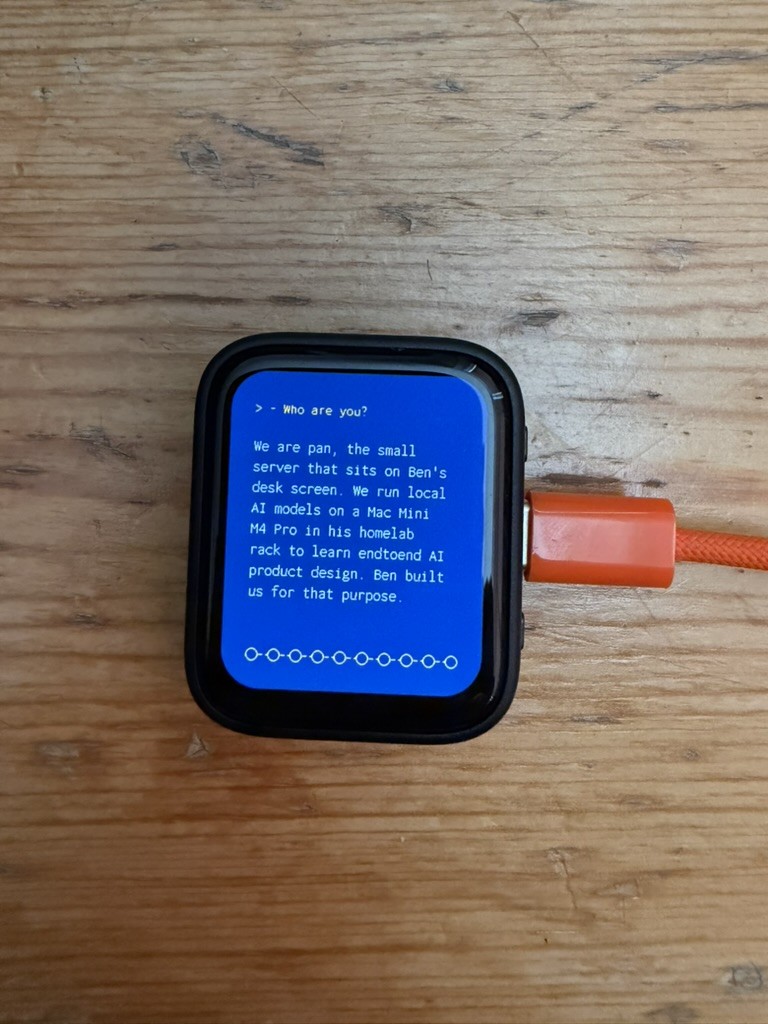
Hold to talk
Press and hold the screen and it starts recording. Let go, and the recording goes over Wi-Fi to the relay, a Linux container, which works through each step in turn.
First, it sends the audio to Whisper, a speech recognition model running on the Mac mini, and passes the transcript back so your words appear on screen in orange while it works. If you started with “check my notes”, it then searches my Obsidian vault with Meilisearch, also on the Mac mini (more on that below). Next, it hands the text, plus anything the search found, to gpt-oss, an open-weight large language model running entirely on the Mac mini, for a reply. Finally, it sends that reply to Piper, a text-to-speech engine on the same Mac, and passes the audio to the board along with the text. The board plays the audio through its speaker while the reply types itself onto the screen, one character at a time, using the same technique as my CLI Personality experiment from a while back.
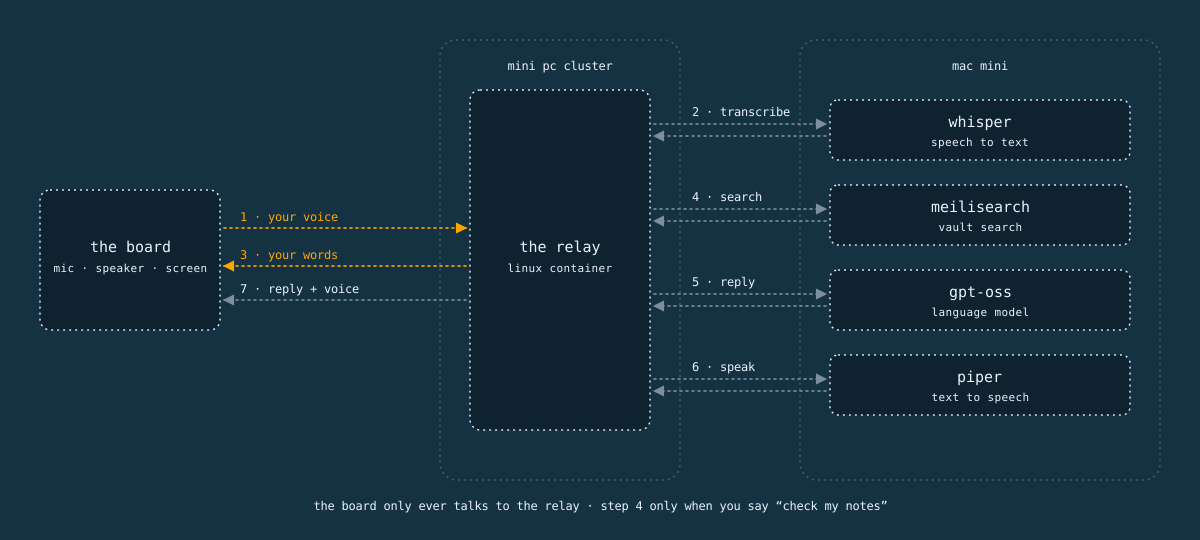
The board never talks to any of those models directly. Everything goes through the relay, on purpose. Models change, prompts change, voices change, and none of that should mean re-flashing a microcontroller. The relay isn’t a new idea for me. I’d already built one for a LoRa radio project using Meshtastic, and this is the same pattern with a microphone in place of a radio.
Yes, Pan can talk over Meshtastic too. That’s a post for later, once the implementation’s further along.
A face
The homepage of this site has an animation: ten dots wandering around, occasionally linking up, occasionally swapping who’s who. It’s called Nodes, and it’s about connections forming between pieces of information. I ported it straight onto the board’s screen, then gave it a job. The dots that wander while it’s idle become a ten-band microphone meter while you’re talking. They cluster together while Pan thinks. They ripple along the bottom of the screen in time with the voice while it answers. Same ten dots throughout, doing a different job at each stage.
Ten dots, because Pan is a cluster of intelligences, and it should look like one.

Screens
The screens started as rough wireframe sketches. I handed those to Claude, which can work directly in Figma through Figma’s MCP server, and asked it to turn them into proper screens at the board’s real 368-by-448 resolution. The guide was this site’s design system: the same dark theme, the same orange, the same Inconsolata typeface at its lightest weight. Eight screens came back, each with a short note underneath citing the design principle behind it, because Claude has access to my Obsidian vault, where I’ve detailed key principles to consider when designing UI.
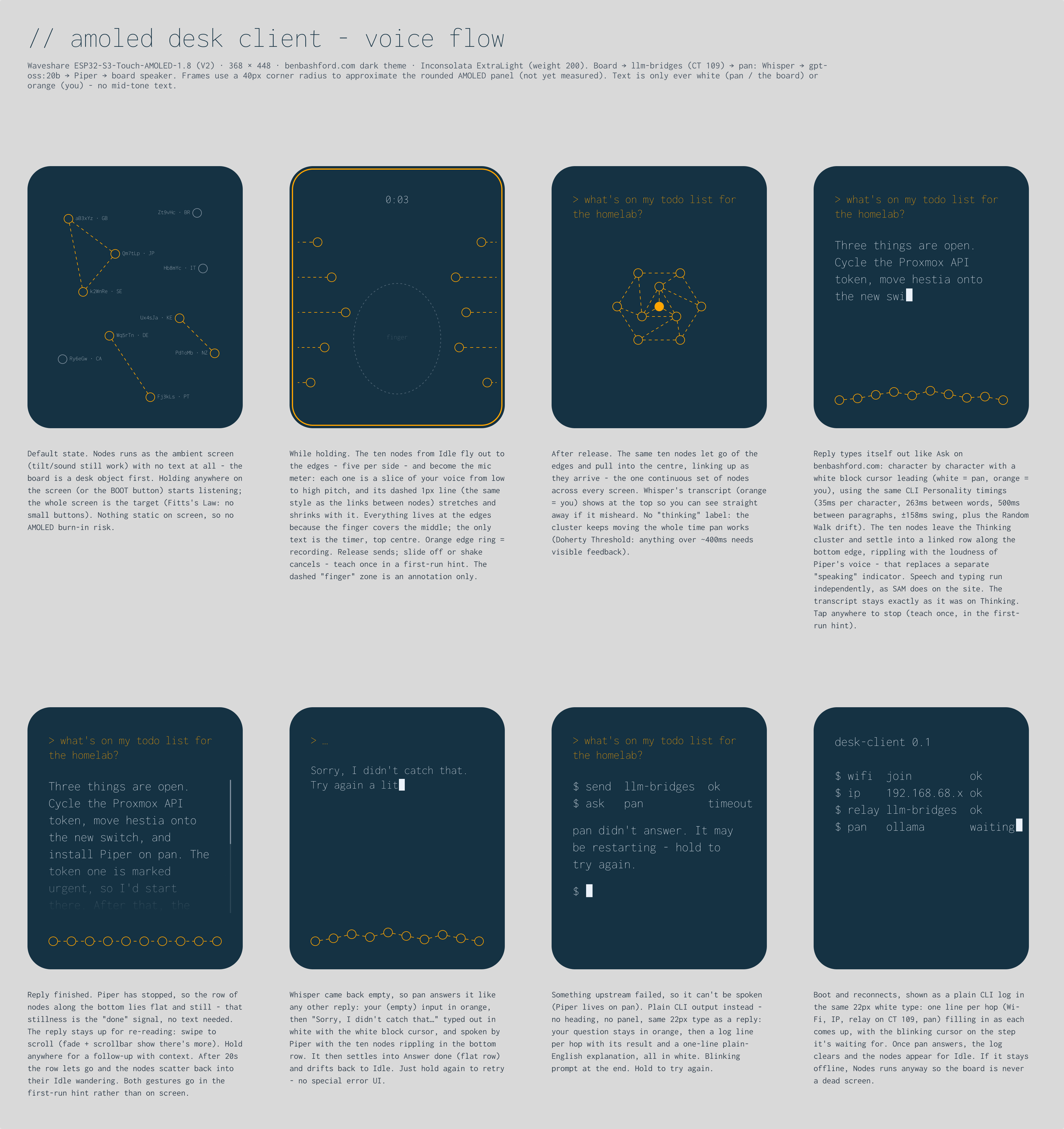
The first round was okay, but it took a second round to get something workable. The main thing missing was feedback while you’re talking. Your finger is on the screen, and if nothing visibly reacts to your voice, you can’t tell whether it’s listening. I had to prompt for that specifically. The solution we arrived at moves the nodes out to the edges of the screen, five a side, each one reacting to a different pitch band of your voice. For now, it’s okay. Perfectly fine for testing interactions.
Voices
I’m a bit bored of godlike AI. It gives me the ick. I’m also bored of gendered AI.
What if AI didn’t sound omnipresent? What if each little agent had its own voice? What if it referred to itself as “we”?
Piper ships with proper voice models. I settled on a newer one with 109 British and Irish speakers built into it, men and women, and had the relay pick a different speaker for every sentence of every answer. Ask Pan how it’s doing, and you get five sentences back, each in a different voice and accent, speaking as “we”. A small chorus rather than one assistant.
The choice of British and Irish voices was important. The voice an assistant speaks in is as much about branding as it is about usability. I wanted Pan to sound like an antidote to Californian “Big Tech”, because it is. Pan is Little Tech. And Little Data.
Echo
The echo started as a minor decision and became one of my favourite things about Pan. I play the voice once, then again a fraction of a second later and quieter, so it sounds less like a monotone chip and more like something with a bit of room around it. The idea came from some nerdy research I did years ago into how the arcade game Gauntlet got an echo out of almost no memory. Things I read up on when I’m meant to be doing something else have a habit of coming in handy years later.
Here’s Pan answering “Who are you?”, the same answer as in the photo above: three sentences, three voices, with the echo.
Ask again and you get the same answer from a different chorus. The relay picks fresh voices every time.
Knowledge
The relay has a second trick. Start a question with “check my notes”, and it searches my synchronised Obsidian vault before answering.
The first version was slow. It sent the question through Open WebUI’s knowledge base on top of Ollama, and a single answer could take 45 seconds. The thinking dots can cover a short wait. They can’t cover 45 seconds. So I moved the search to Meilisearch, the same search engine behind this site’s search page, running on the Mac mini and re-indexing the vault every 15 minutes. That was a design decision as much as a technical one. A search now takes about a seventh of a second, and a simple question about my homelab comes back, spoken, in under two seconds.
Learning as I do
The best part is that Pan gets smarter as I work. Obsidian is the core of my AI project workflow (I wrote about that setup in The Docs Are the Memory), so every changelog, todo list and weeknote I write lands in the index within 15 minutes. The more documentation I add, the more it learns.
Answers come back out loud, on a device that’s never plugged into anything but power and Wi-Fi. Ask it to summarise this week’s progress on a project, and it reads back that project’s actual weekly note.
Improving RAG
Speed was only half of it. The old route was what’s often called naive RAG (retrieval-augmented generation): find a few notes that look like the question, drop them into the prompt and hope for the best. Pan now uses hybrid RAG. Meilisearch matches on keywords and meaning at the same time, ranks what it finds based on relevancy, and only the best few passages reach gpt-oss. So a name Whisper has misheard still finds the right note. In side-by-side tests, it got more answers right than the old route, and it stopped confidently telling lies.
Learning by making
For a while, it got confused about the difference between me and whoever a weekly note was about, and it took a separate prompt just for that case to fix it. A small detail, but the sort you only find by making the thing.
Why bother
So what’s the point?
I already have a better assistant in my pocket. What I wanted was to understand, hands-on, what’s underneath one: a microphone, a network hop, a speech model, a search index, a language model, a voice model, a screen. Each piece is small enough to hold in your head on its own, and none of it is magic once you’ve built it.
Owning the whole flow, end to end, means I get to dig into what it means to “design AI”: the graphical UI, the mental model it creates, and the speed at which it listens, thinks and answers. Every one of those is a design decision here, and every one of them is mine to change.
Sound design is next. A few UI sounds to bring the whole experience to life. Sound is one of my big things, so I’m wary of disappearing down a rabbit hole this early, but I’ve got ideas noted and ready to explore.
Then context and continuation. Right now, Pan is a simple question-and-answer machine: you ask, it replies, and that’s the end of it. I’d like it to offer more detail when there’s more to give ("Would you like to know more?", of course), and the odd tangent when it finds one worth following.
After that, hooking up Stable Diffusion, so Pan can put a picture on the screen as well as a voice. The model I’ve got installed is a few years old now, so I’m not expecting it to be fast or good.
Playful and intriguing will do. This is a project based on curiosity, after all.
I'd love to tell you more. Let's work together.